
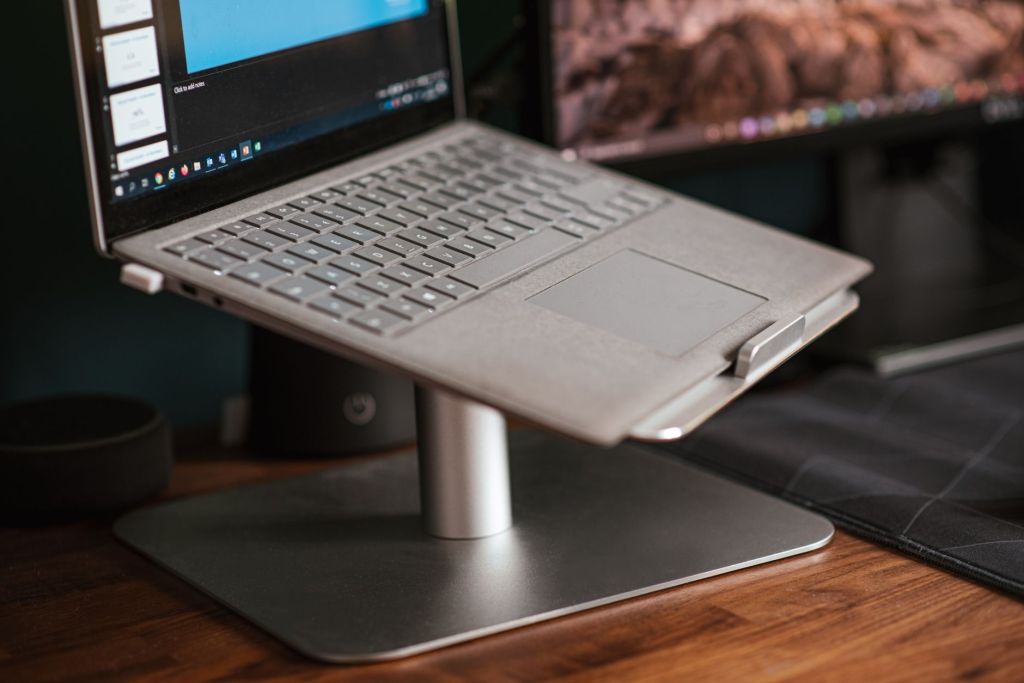
A laptop stand can make studying and working more comfortable by raising the laptop screen to a better viewing height. It can also create more space on the desk and may improve airflow around the laptop.
Students, office workers, trainers and people working from home may spend several hours each day using a laptop. Choosing a suitable stand can therefore improve comfort and make the workspace more organised.
In this guide, we will look at the important features to consider when choosing a laptop stand in India.
1. Why Use a Laptop Stand?
When a laptop is placed directly on a desk, the screen may be lower than a comfortable viewing position. This can encourage users to bend their neck or lean forward while working.
A laptop stand raises the device and can help position the screen closer to eye level. When combined with an external keyboard and mouse, it can create a more comfortable desktop-style setup.
A stand can also provide additional airflow beneath the laptop, depending on its design.
2. Adjustable Height and Viewing Angle
An adjustable laptop stand allows users to change the height and angle of the laptop according to their seating position and desk.
This can be useful when the same stand is used by different people or in different locations such as a home desk, office, classroom or training room.
When choosing an adjustable stand, check whether the adjustment mechanism is stable and whether the laptop remains secure at the selected position.
Recommended Adjustable Laptop Stand – Portronics My Buddy K
The Portronics My Buddy K is a lightweight, foldable laptop stand designed for students, office professionals and people working from home. Its aluminium-alloy construction and silicone contact pads provide a practical combination of portability and support for everyday laptop use.
The stand offers six adjustable viewing positions, allowing users to raise and tilt their laptops to a more comfortable angle. Its open-frame design promotes airflow beneath the laptop, while its compact, foldable construction makes it convenient to carry in a backpack or laptop bag.
Weighing approximately 260 grams, the Portronics My Buddy K is particularly suitable for students attending online classes, professionals working at desks and users who frequently change work locations. It supports compatible laptops up to 15.6 inches.
View Portronics My Buddy K Adjustable Laptop Stand on Amazon
3. Laptop Size Compatibility
Laptop stands are designed to support different screen sizes and weights.
Before buying, check the manufacturer’s recommended laptop size range. A stand designed for smaller laptops may not provide enough stability for a larger or heavier device.
Also check whether the support arms and base allow the laptop to sit securely without blocking important ports.
4. Stability and Build Quality
A laptop stand should remain stable while typing, adjusting the screen or connecting accessories.
Metal stands are often strong and may help with heat dissipation, while good-quality plastic stands can be lighter and easier to carry.
Look for non-slip pads on the base and laptop supports. These can help prevent the stand from sliding and protect the laptop from scratches.
5. Ventilation and Cooling
Laptops generate heat during use, especially when running demanding software, video calls or multiple applications.
An open-frame laptop stand can improve airflow around the bottom of the laptop compared with placing it directly on a soft surface.
However, a laptop stand should not be considered a replacement for proper laptop cooling or maintenance. Keep ventilation openings clean and avoid blocking the laptop’s air vents.
6. Portable Laptop Stands
Students and professionals who frequently travel may prefer a lightweight, foldable laptop stand.
Portable stands can fit into a laptop bag and can be useful in libraries, classrooms, offices, hotels and shared workspaces.
When choosing a portable stand, compare its folded size, weight and stability. Very lightweight designs may be convenient to carry but should still provide adequate support for the laptop.
Recommended Height-Adjustable Laptop Stand – Amazon Basics Double Layer Aluminium Riser
The Amazon Basics Double Layer Adjustable Laptop Stand is a practical choice for students, office professionals and people working from home who want greater flexibility in positioning their laptops. Its aluminium construction and double-layer tabletop design provide an elevated workspace suitable for everyday computing.
The stand offers adjustable height and viewing angles, allowing users to position their laptop screens according to their desk setup and preferred working posture. It is advertised as compatible with laptops up to 17 inches, making it an option for users with larger notebooks.
Its adjustable design is particularly useful for online meetings, studying, video calls and extended desktop work. For improved typing comfort, users may prefer pairing the stand with an external keyboard and mouse.
Before purchasing, buyers should confirm their laptop’s dimensions and weight against the manufacturer’s specifications and check the available adjustment range.
View Amazon Basics Double Layer Adjustable Laptop Stand on Amazon
7. Laptop Stands for Home and Office Desks
For a permanent desk setup, stability and comfort may be more important than portability.
A larger metal stand can provide a stable platform and may create additional space underneath the laptop for a keyboard, notebook or other accessories.
Users who regularly work with an external monitor may also use a laptop stand to position the laptop screen at a similar height to the monitor.
Recommended Desktop Laptop Stand – Nulaxy C3 Aluminium Laptop Riser
The Nulaxy C3 Aluminium Laptop Stand is a sturdy and elegantly designed desktop riser suitable for students, office professionals and people working from home. Its durable aluminium-alloy construction provides a stable platform for compatible laptops, while its elevated design helps position the screen at a more comfortable viewing height.
Designed for laptops approximately 10 to 15.6 inches in size, the stand features protective rubber pads to reduce slipping and help prevent scratches. Its open-frame construction encourages airflow around the laptop, making it practical for extended study sessions, office work and everyday computing.
The detachable three-piece design allows the stand to be disassembled for storage or transportation. Unlike height-adjustable models, the Nulaxy C3 provides a fixed elevated position and is best suited to a permanent or semi-permanent desk setup. Using an external keyboard and mouse is recommended for comfortable typing.
View Nulaxy C3 Aluminium Laptop Stand on Amazon
8. Foldable vs Fixed Laptop Stands
Foldable stands provide flexibility because they can usually be adjusted and stored easily. They are suitable for users who travel or frequently change work locations.
Fixed stands generally provide a simpler and more stable setup but may offer fewer adjustment options.
The right choice depends on whether portability, adjustability or maximum stability is more important to you.
9. Using an External Keyboard and Mouse
When a laptop is raised significantly above desk level, typing directly on its keyboard may become uncomfortable.
For this reason, an external keyboard and mouse can be useful when using a laptop stand for long periods.
This setup allows the laptop screen to remain elevated while the keyboard and mouse stay at a comfortable position on the desk.
10. What to Check Before Buying
Before purchasing a laptop stand, consider:
- Laptop size and weight compatibility
- Adjustable height and viewing angles
- Stability
- Build quality
- Non-slip protection
- Ventilation
- Portability
- Foldable design
- Desk space
- Warranty and customer support
It is also useful to read recent customer reviews to understand how the stand performs during regular use.
Which Laptop Stand Should You Choose?
Students who frequently carry their laptops may prefer a lightweight and foldable stand.
Professionals working from a fixed desk may prefer a stronger metal stand with greater stability and height adjustment.
People working from home for long hours may benefit from an adjustable stand combined with an external keyboard and mouse.
The best choice is the one that matches your laptop size, workspace and daily usage.
Conclusion
A laptop stand is a simple accessory that can make a study or work setup more comfortable and organised. Features such as height adjustment, stability, laptop compatibility, ventilation and portability should be considered before purchasing.
Rather than choosing only by appearance or price, compare the stand with your laptop size and the way you normally work. A stable and practical stand can be useful for students, professionals and work-from-home users alike.
Affiliate Disclosure: Some links in this article may be affiliate links. If you make a qualifying purchase through these links, Chrisolas Solutions may earn a commission at no additional cost to you. As an Amazon Associate, Chrisolas Solutions earns from qualifying purchases.


Leave a Reply